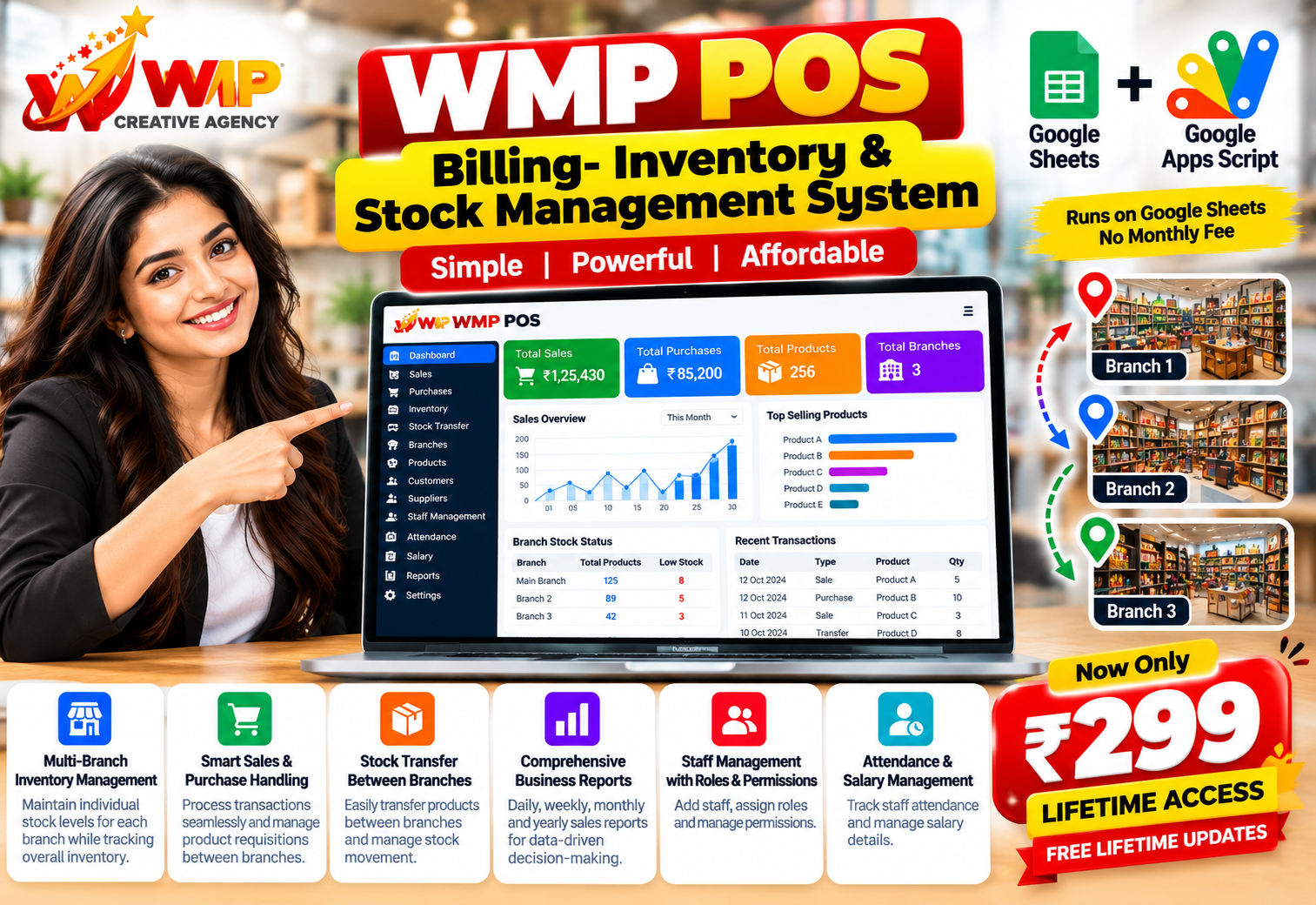
WMP POS Billing — Inventory & Stock Management System
Apps Script
Google Sheets
Web App
WMP Verified
₹299
₹4,999
Inclusive of GST (18%)
Offer ends in
00Days
00Hrs
00Min
00Sec
Key Features
Multi-branch inventory — stock per branch and overall stock
Sales and purchases — transactions and branch requisitions
Stock transfers — move stock between branches
Supplier coordination — keep purchases aligned with stock
Sales reports — daily, weekly, monthly, and yearly
Staff roles and permissions — control what each role can do
Staff attendance — record who is present
Salary tracking — keep staff pay details with the team record
Description
WMP POS Billing is a ready-made Google Sheets + Google Apps Script system for shops and multi-branch businesses that need billing, inventory, and staff control in one place.
Run it as a web app on top of Google Sheets — no hosting, no MySQL, no server setup. Make a copy of the sheet, authorize the script, and start billing.
What it covers
1) Multi-branch inventory
- Keep a separate stock level for each branch
- See overall inventory across all branches
- Track products, quantities, and branch-wise availability
2) Sales and purchases
- Process sales and purchase transactions
- Raise and manage product requisitions between branches
- Keep sales and purchase records in the same system
3) Supply chain
- Transfer stock from one branch to another
- Coordinate with suppliers
- Keep branch stock aligned with purchases and transfers
4) Business reports
- Daily, weekly, monthly, and yearly sales reports
- Use the numbers for day-to-day and long-range decisions
5) Staff, roles, and payroll basics
- Add staff and assign roles
- Control what each role is allowed to do
- Record staff attendance
- Track salary details for the team
WMP POS is an all-in-one sheet for sales, inventory, and branch management, so a growing shop can run more than one location without a separate server.
Who it is for
- Retail shops with more than one branch
- Stores that buy, sell, and move stock between locations
- Owners who want billing, stock, and staff records in Google Sheets
How delivery works
- You receive a Google Sheet “Make a copy” link after purchase
- Apps Script is bound to the sheet — open Extensions → Apps Script to view source
- Open the web app from the script project
- Share the sheet with your team and assign staff roles
Run it as a web app on top of Google Sheets — no hosting, no MySQL, no server setup. Make a copy of the sheet, authorize the script, and start billing.
What it covers
1) Multi-branch inventory
- Keep a separate stock level for each branch
- See overall inventory across all branches
- Track products, quantities, and branch-wise availability
2) Sales and purchases
- Process sales and purchase transactions
- Raise and manage product requisitions between branches
- Keep sales and purchase records in the same system
3) Supply chain
- Transfer stock from one branch to another
- Coordinate with suppliers
- Keep branch stock aligned with purchases and transfers
4) Business reports
- Daily, weekly, monthly, and yearly sales reports
- Use the numbers for day-to-day and long-range decisions
5) Staff, roles, and payroll basics
- Add staff and assign roles
- Control what each role is allowed to do
- Record staff attendance
- Track salary details for the team
WMP POS is an all-in-one sheet for sales, inventory, and branch management, so a growing shop can run more than one location without a separate server.
Who it is for
- Retail shops with more than one branch
- Stores that buy, sell, and move stock between locations
- Owners who want billing, stock, and staff records in Google Sheets
How delivery works
- You receive a Google Sheet “Make a copy” link after purchase
- Apps Script is bound to the sheet — open Extensions → Apps Script to view source
- Open the web app from the script project
- Share the sheet with your team and assign staff roles
Requirements
Google account (Gmail / Google Workspace)
Access to Google Sheets
Permission to run Google Apps Script (authorize once)
Modern browser (Chrome recommended)
Internet connection for Sheets + web app
What's Included
Google Sheet POS template (Make a copy delivery)
Bound Google Apps Script web app source
Billing, inventory, purchases, transfers, reports, and staff modules
Setup guide (copy sheet → authorize → open web app)
Free future updates for this version line
Installation support to get the sheet and script running
Resale / white-label rights under Regular License
Item Details
- Version v1.0
- Published Oct 13, 2026
- Platform Google Sheets + Google Apps Script
- Database Google Sheets
- Category POS & Retail
- Support Installation support
- License Regular License
What You Get
-
Google Sheet POS
Make-a-copy spreadsheet for branches, stock, sales, purchases, transfers, suppliers, and staff
-
Apps Script Web App
Bound script for billing, inventory, reports, roles, attendance, and salary screens
-
Setup Guide
Copy the sheet, authorize Apps Script, open the web app, and add staff roles
-
Installation Support
Help with authorization, sharing, and the first branch setup
-
Free Updates
Fixes and improvements on this version line at no extra fee
Need This Customized For Your Business?
Extra modules, branding, APIs, dark mode, and dedicated support — tell us what you need.
50+Projects Delivered
3Script Stacks
WHAT WE CUSTOMIZE
Features & Functions
Modify modules and automations
API & Integrations
WhatsApp, payments, CRMs
Design & UI Changes
Branding, dark mode, mobile
Full Custom Projects
Dashboards & systems from scratch
20–30% advance to start · Clear milestones · Post-delivery support available
Reviews & Feedback
No reviews yet. Be the first to share feedback.
